
Data Code Modelling: Abstract Base Classes
Building robust code for data engineering workflows
Tony Zeljkovic
2024-04-28
When working in data engineering, you will often have to work with python code bases to manage all sorts of processes in your data stack from ETL, to orchestration, to infrastructure management, to observability and much more.
One view of data engineering is that of a blend of software engineering and data science. Oftentimes as data engineers, we will spend time learning about general code best practises in software engineering and try to apply them to our domain.
However, a lot of the times these general principles fall short of the standards we would like to achieve.
On top of that, there has been a lot of development of python and the ecosystem around it so it's possible to be a lot more intentional about our code design.
The big picture
Let's take a step back and think about the bigger picture here. Python as a language is a strongly but a dynamically typed language. Simply put, python has a strict type system but how it used during runtime is flexible. If designed for then, python can get a lot closer (though not quite) to the type safety provided by statically strong typed languages.
Although the default configuration of python code is fine for development, for production systems we want a lot more guarantees about the consistency of our code. This is where a data code model comes into play. This is different for every project, but this article and follow up articles will provide a framework by which you can make your own informed decisions.
Creating a solid code data model leads to dramatically different trajectories for the amount of scope a team can handle.
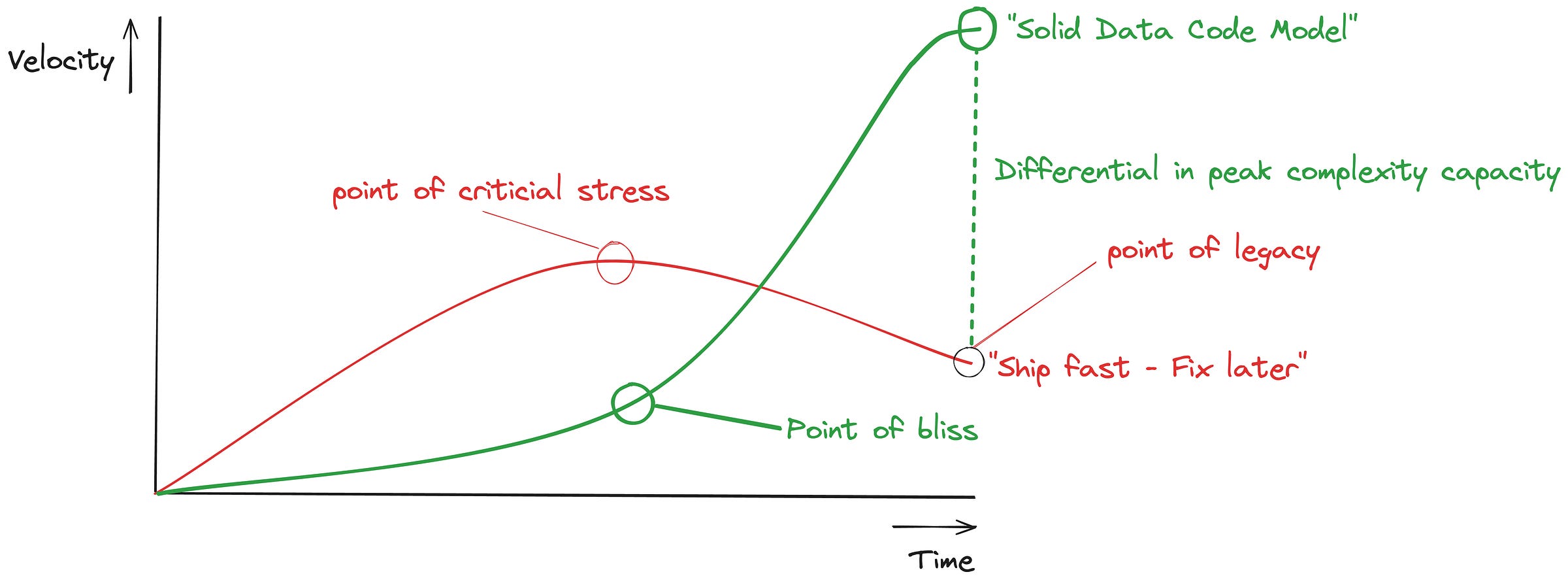
When the focus is solely "ship fast - fix later", this builds tech debt until a point of critical stress. At this point, the code base is bearing so much technical debt your teams time is absorbed with bug fixes, ad-hoc requests, refactoring and more. Development velocity reduces significantly until a point of legacy is reached. At this point, there is too many features, dependencies and dollars at stake to change trajectory so the company is left with a legacy code base which becomes increasingly slower to change.
When working with a proper code data model, initial velocity is lower. However, after some initial hurdles you reach a point of bliss after which developing more features and complexity becomes exponentially more easy until a higher level of peak complexity is reached.
Some of the reasons why is:
-
Improved readability → Less documentation burden.
-
Lower fragility of code changes → higher development velocity.
-
Faster time to resolution on bugs → Better uptime.
-
Static and runtime controls → Less need for extensive unit testing
-
A higher capacity for complexity and features → More value, lower costs
So then, how to go at this concretely? In this article series, I will go over the data code model to structure your python code for data engineering. In this article, I will focus on the first component: Abstract Base Classes
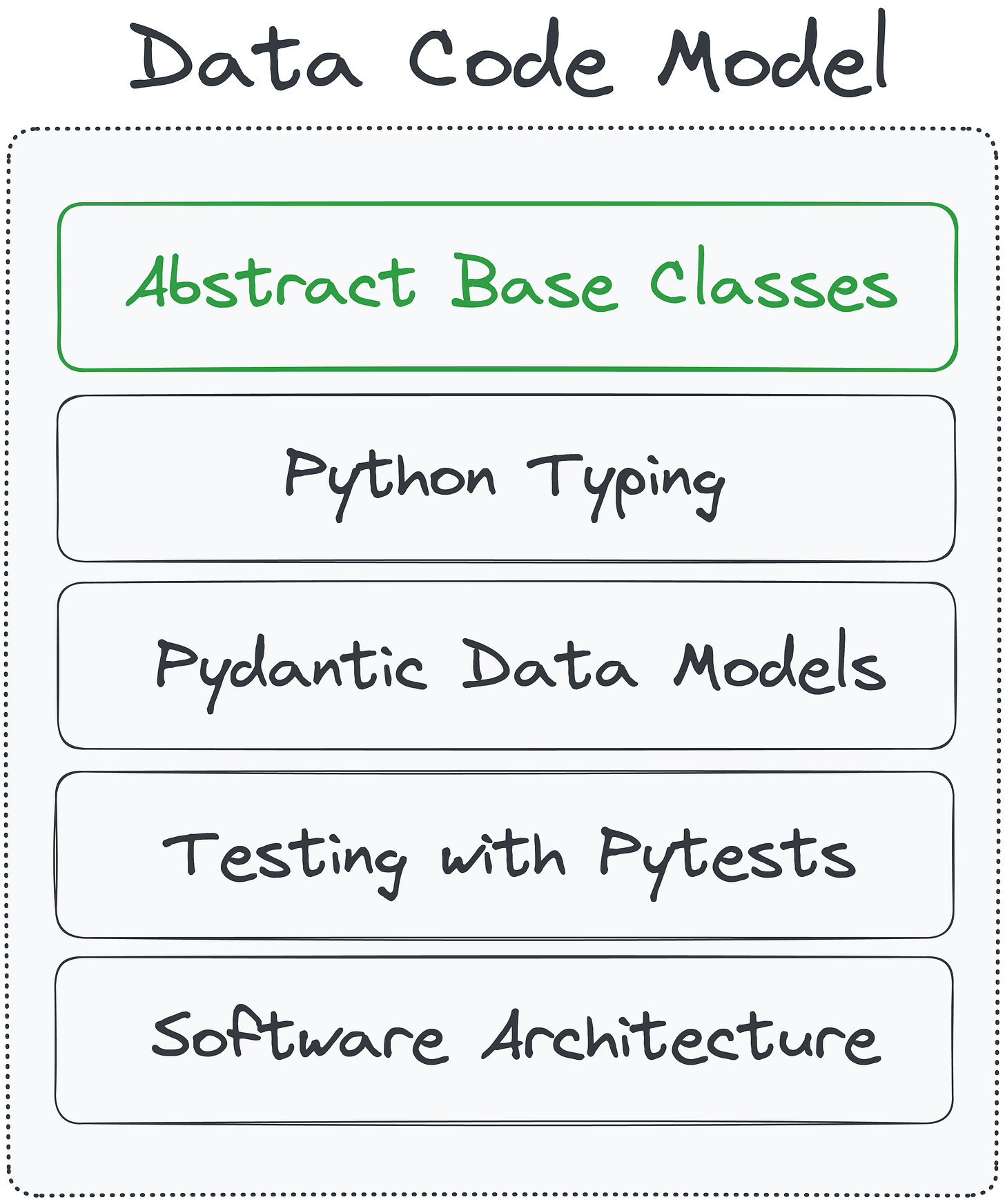
Layer 1: Abstract Base Classes
Abstract Base Classes (ABCs) in Python serve as templates for other classes. They outline a set of definitions that must be created in any subclass that inherits from them. The primary purpose of ABCs is to ensure a consistent interface across different implementations. By defining an abstract base class, you're essentially setting a contract for what functionalities a set of classes should have.
An example of a abstract class is shown below
from abc import ABC, abstractmethod

class Animal(ABC):
    @abstractmethod
    def make_sound(self):
        """Each subclass must implement a method to make a specific animal sound."""
        pass

    @abstractmethod
    def move(self):
        """Each subclass must implement a method to define how the animal moves."""
        pass

class Dog(Animal):
    def make_sound(self):
        return "Bark"

    # The 'move' method is intentionally not implemented to demonstrate the error

class Fish(Animal):
    def make_sound(self):
        return "Blub"

    def move(self):
        return "Swims"

# Try to instantiate classes and use methods
if __name__ == "__main__":
    try:
        animal = Animal()  # This will raise an error because Animal is abstract
    except TypeError as e:
        print("Error:", e)

    try:
        dog = Dog()  # This will also raise an error because it does not implement all abstract methods
    except TypeError as e:
        print("Error:", e)

    fish = Fish()  # This will work fine

    print("Fish:", fish.make_sound(), "and", fish.move())
    # Dog and Animal instantiation errors are shown in the output
In this simple example, we have a abstract base class Animal, which prescribes any subclass needs to implement a make_sound and move method. We cannot instantiate the Animal class itself directly as it's used for templating. We also cannot instantiate the subclasses if they don't implement the required methods. So, abstract base classes are a way of enforcing a contract for a specific set of classes. That is, it defines a set of prescriptions of how a class should be constructed and typically resides in the first most basal layers in a code base.
Abstract Base Class Methods
The ABC library in python is very small at <200 lines of code as of today. As such there's really only a few simple components from this library that will cover 95% of use cases. The @abstractmethod decorator is the main interface to create abstract definitions. It can be used in conjunction with a few types of methods in a class:
Abstract classmethod
A class method is a class function that can be used without instantiating a class object first. Creating a class object can be done by combining the @abstractmethod with a @classmethod decorator like so:
from abc import ABC, abstractmethod

class DataSource(ABC):
    @classmethod
    @abstractmethod
    def configure(cls, config):
        """
        Configures database connection parameters. Each subclass must implement this
        method based on its database type specifications.
        """
        pass

    @abstractmethod
    def execute_query(self, query):
        """
        Executes a given query on the database instance. Implementation will vary
        depending on the database type.
        """
        pass

class SQLDataSource(DataSource):
    connection_params = {}

    @classmethod
    def configure(cls, config):
        cls.connection_params = config
        return f"Configured SQL database with parameters: {cls.connection_params}"

    def execute_query(self, query):
        return f"Executing SQL query: '{query}' with parameters {self.connection_params}"

class NoSQLDataSource(DataSource):
    environment_settings = {}

    @classmethod
    def configure(cls, config):
        cls.environment_settings = config
        return f"Configured NoSQL database with settings: {cls.environment_settings}"

    def execute_query(self, query):
        return f"Executing NoSQL query: '{query}' with settings {self.environment_settings}"

# Usage of class methods and instance methods
sql_config = {'host': 'localhost', 'port': 5432}
print(SQLDataSource.configure(sql_config))

nosql_config = {'environment': 'cloud', 'replication': 'enabled'}
print(NoSQLDataSource.configure(nosql_config))

sql_data_source = SQLDataSource()
print(sql_data_source.execute_query("SELECT * FROM users"))

nosql_data_source = NoSQLDataSource()
print(nosql_data_source.execute_query("{find: 'users', filter: {active: true}}"))
In this example we create an abstract base class for DataSource with functions configure and execute_query. The subclasses SQLDataSource and NoSQLDataSource are inheriting from DataSource and they will need to implement these methods now. Notice the difference between a classmethod and an instance method ("regular method"). The classmethod does not need an instance of the class, but has access to (default) attributes of the class through cls, whereas an instance method is more tightly bound to that instance of the class and can access the attributes of the current instance through self. A classmethod then, is for example useful when dealing with more complicated shared setup.
Abstract staticmethod
A staticmethod is essentially a regular python function that is tied to the namespace of a class. This method can be called without a class instance (unlike regular functions added to a class) and it does not have access to the internal properties of the class (so no access to self or cls). Similarly to an abstract classmethod, you can create these by combining the @abstractmethod with a @staticmethod decorator like so:
from abc import ABC, abstractmethod

class DataFormatter(ABC):
    @staticmethod
    @abstractmethod
    def format_data(data):
        """Define a standard way to format data."""
        pass

class JSONFormatter(DataFormatter):
    @staticmethod
    def format_data(data):
        """Format data as JSON."""
        import json
        return json.dumps(data, ensure_ascii=False)

class CSVFormatter(DataFormatter):
    @staticmethod
    def format_data(data):
        """Format data as CSV."""
        import csv
        from io import StringIO
        output = StringIO()
        writer = csv.DictWriter(output, fieldnames=data[0].keys())
        writer.writeheader()
        writer.writerows(data)
        return output.getvalue()

# Usage example
if __name__ == "__main__":
    # Example data
    data_dict = {"name": "Alice", "age": 30, "city": "New York"}
    data_list = [
        {"name": "Alice", "age": 30, "city": "New York"},
        {"name": "Bob", "age": 25, "city": "Los Angeles"}
    ]

    # Format as JSON
    json_data = JSONFormatter.format_data(data_dict)
    print("JSON Formatted Data:")
    print(json_data)

    # Format as CSV
    csv_data = CSVFormatter.format_data(data_list)
    print("CSV Formatted Data:")
    print(csv_data)
Static methods are great for utility classes that keep a set of functions for similar purposes or processes that can be used across functions and classes that are independent of each other.
Abstract property method
A property is a class function that is used to create a attribute for the class. Again, creating an abstract property can be done through combining @abstractmethod with a @property decorator like so:
from abc import ABC, abstractmethod

class DatabaseConfig(ABC):
    @property
    @abstractmethod
    def connection_string(self):
        """Define a standardized property to get a database connection string."""
        pass

class ProductionDatabaseConfig(DatabaseConfig):
    def __init__(self, host, database, user, password):
        self.host = host
        self.database = database
        self.user = user
        self.password = password

    @property
    def connection_string(self):
        """Generate a connection string using production credentials."""
        return f"Server={self.host};Database={self.database};User Id={self.user};Password={self.password};"

class DevelopmentDatabaseConfig(DatabaseConfig):
    def __init__(self, host, database):
        self.host = host
        self.database = database

    @property
    def connection_string(self):
        """Generate a connection string using development credentials with default user."""
        return f"Server={self.host};Database={self.database};User Id=dev;Password=dev;"

# Usage example
if __name__ == "__main__":
    # Initialize configurations
    prod_config = ProductionDatabaseConfig("prod-server", "prod-db", "admin", "securepassword")
    dev_config = DevelopmentDatabaseConfig("dev-server", "dev-db")

    # Print connection strings
    print("Production Connection String:")
    print(prod_config.connection_string)
    print("Development Connection String:")
    print(dev_config.connection_string)
Properties are useful when the definition of a class attribute is dependent on values of other attributes within the class or when this attribute requires a more elaborate calculation to set. Note that properties are separate entities from class attributes.
Using @abstractmethod with other function constructs
As you have probably noticed by now, all of the above methods follow a very similar structure where any function can be decorated with @abstractmethod to make it abstract. This is very flexible and allows for a lot of different types of flexible definitions. Again, check the source code, it is pretty straightforward. A few more advanced examples of types of functions that @abstractmethod can be applied to with useful purposes in data engineering are shown below.
Abstract Context Manager
Context managers in Python provide a convenient way to allocate and release resources precisely when needed. By using the with statement, context managers ensure that resources are automatically managed (such as opening and closing files, or acquiring and releasing locks) without needing explicit cleanup code. This is useful for a few different types of operations:
-
Handling files
-
Handling database connections
-
Asynchronous and Concurrent operations
The contextlib library in python provides excellent construct to create your own context managers and combining this with @abstractmethod allows to create a data model for code covering these very common use cases.
For example, let's say we want to define a set of file handling context managers that are specifically written for encrypting data. We want to make sure that if our encryption fails, we still close any file we opened. We may also want to have custom exception behavior. This may look something like this:
from abc import ABC, abstractmethod
from contextlib import contextmanager
from cryptography.fernet import Fernet

class CryptoFileManager(ABC):
    @abstractmethod
    @contextmanager
    def secure_file_handler(self, path, mode, key):
        """A context manager for encrypting or decrypting files."""
        pass

class FileEncryptor(CryptoFileManager):
    @contextmanager
    def secure_file_handler(self, path, mode, key):
        """Encrypts file content on write."""
        try:
            cipher = Fernet(key)
            with open(path, mode) as file:
                data = file.read()
                encrypted_data = cipher.encrypt(data.encode())
                file.seek(0)
                file.write(encrypted_data.decode())
                yield file
        except Exception as e:
            print(f"Failed to encrypt file: {e}")
        finally:
            print(f"File encryption completed and file {path} has been closed.")

class FileDecryptor(CryptoFileManager):
    @contextmanager
    def secure_file_handler(self, path, mode, key):
        """Decrypts file content on read."""
        file = None
        try:
            cipher = Fernet(key)
            file = open(path, mode)
            encrypted_data = file.read()
            decrypted_data = cipher.decrypt(encrypted_data.encode())
            file.seek(0)
            file.write(decrypted_data.decode())
            file.seek(0)
            yield file
        except Exception as e:
            print(f"Failed to decrypt file: {e}")
        finally:
            if file:
                file.close()
                print(f"File decryption completed and file {path} has been closed.")

# Example usage
key = Fernet.generate_key()  # Normally you would store and retrieve this securely
if __name__ == "__main__":
    encryptor = FileEncryptor()
    decryptor = FileDecryptor()
    # Encrypt data
    with encryptor.secure_file_handler('testfile.txt', 'w+', key) as file:
        file.write("Sensitive data that needs encryption.")
    # Decrypt data
    with decryptor.secure_file_handler('testfile.txt', 'r+', key) as file:
        print("Decrypted content:", file.read())
the contextlib library also provides constructs for defining async context managers which are invaluable when working with async code. This is especially relevant when dealing with many types of connections such as database connections or API connections:
from abc import ABC, abstractmethod
import asyncio
import asyncpg
import time

class AsyncDatabaseManager(ABC):
    @abstractmethod
    async def query(self, dsn, sql):
        """An asynchronous context manager for executing and timing database queries."""
        pass

class PostgreSQLQueryManager(AsyncDatabaseManager):
    async def query(self, dsn, sql):
        conn = None
        try:
            conn = await asyncpg.connect(dsn)
            start_time = time.time()
            result = await conn.fetch(sql)
            yield result
        except asyncpg.PostgresError as e:
            print(f"Query failed: {e}")
        finally:
            if conn:
                await conn.close()
                print(f"Query took {time.time() - start_time:.2f} seconds to execute and connection has been closed.")

# Usage example
async def main():
    dsn = "postgresql://user:password@localhost:5432/mydatabase"
    sql = "SELECT * FROM my_table"
    manager = PostgreSQLQueryManager()
    async with manager.query(dsn, sql) as result:
        for record in result:
            print(record)

if __name__ == "__main__":
    asyncio.run(main())
Abstract Collections
The python standard library provides ABC class templates for specific types of classes in the collections library. These can be used as development guides when developing more complex code constructs such as iterators and asynchronous code. It is beyond the scope of this article to delve deeper into the implementation of these (potentially) performance enhancing implementations.
Concluding remarks
That's it for abstract base classes! Although simple, abstract base classes can be an invaluable component for generating inheritance based object-oriented data models for your python code bases. However, abstract base classes are still not the complete picture.
Although we can define what our classes should implement, we are still in the dark when it comes to types. Also, what if we want to define more stringent implementation control without creating strong object dependencies? Expanding into typing will help us address some of these issues.
References
-
Abstract Base Class Documentation: docs.python.org/3/library/abc.html
-
Abstract Base Class Implementation: github.com/python/cpython/blob/3.12/Lib/abc.py
-
Difference between class method, static method and regular method: realpython.com/courses/python-method-types
-
github.com/lord63/awesome-python-decorator has a good collection on python decorator resources
-
integralist.co.uk/posts/python-generators has a good collection on iterators, generators and coroutines.
-
docs.python.org/3.7/library/collections.abc.html provides a list of built in abstract base classes
-
abc collections source code: github.com/python/cpython/blob/3.12/Lib/_collections_abc.py
-
contextlib: docs.python.org/3/library/contextlib.html